ASCII art rendering of the BB9 logo with various patterns creating contrast and texture inside the circle.

Layer 1 — Getting Started

TL;DR: Get from zero → live system that can hold a coherent conversation and book calls. We're not extracting the last drops of power yet from BB9, we're making sure what you've built is functional.

Overview

1. Build

Build your first working BB9 setup, connect the right agents, test it, and launch safely.

2. Test

Diagnose bad output, missed handoffs, weak conversations and low booking performance.

3. Launch

Deploy BB9 across more accounts, reuse what works and avoid problems as you expand.

Section 1 - Before You Touch Anything

"By failing to prepare, you are preparing to fail."Benjamin Franklin

Don't build yet.

You need to plan what you're going to give BB9.

Don't give him everything.

Give him what he needs.

If your inputs are generic, or too comprehensive, you will change the output of the system.

You need to prepare what information you're going to give. We recommend having the following 5 things ready.

The Five Things

Have these ready before you continue:

  1. Clear offer
    What are you actually selling? Be specific.
    Bad: “help people grow online”
    Good: “help coaches sign 3–5 clients per month using Instagram DMs”
  2. Who it’s for (ICP)
    Who should BB9 be talking to?
    Bad: “anyone interested in fitness”
    Good: “men 25–40 who want to lose 10–20 lbs and have tried diets before”
  3. Desired outcome
    What does the lead actually want?
    Income? physique? business growth? clarity?
    BB9 needs to aim at something real.
  4. Your call to action
    What are you trying to get them to do? (Pick one per agent only.)
    • book a call
    • sign up for a trial
    • join a community
  5. Real conversations (if you have them)
    2–5 past DMs or sales conversations. These are gold:
    • they show how your leads actually talk
    • they show objections
    • they show what works and what doesn’t

What if I don't have conversation examples?

Continue and use the structure of the Teach tool to get "close enough" to start.

Does codifying niche and offer really matter?

We push people to understand this deeply because if you make it up as you build BB9, it's far more likely you will end up with subtle conflicts and contradictions inside your final product. Conflicting instructions is one of the fastest ways to kill your performance with BB9.

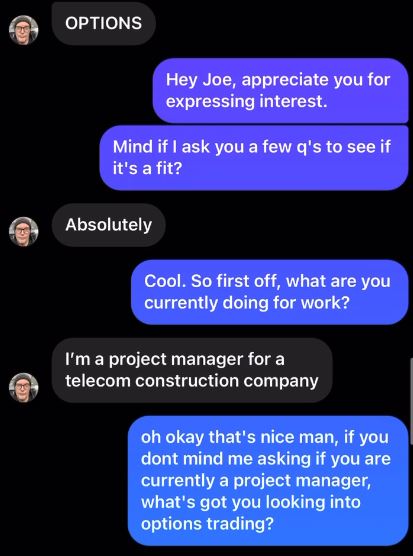
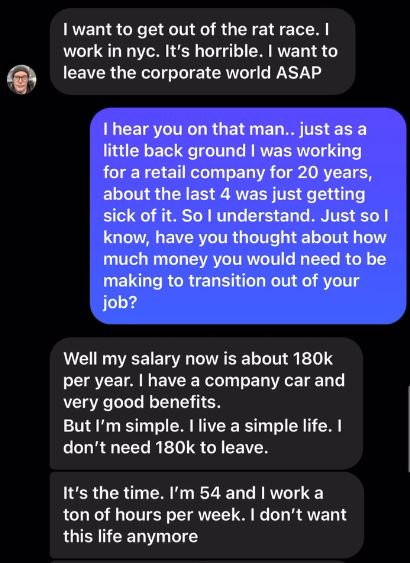
Example Useful Conversation

I've attached an example of a Good conversation, that we could use to inform our BB9 build. As you review this real conversation, think about how it could be divided into logical steps. There's no art here - this conversation is simply a greeting + current situation + interest question + relate statement and goal question + relate statement and pitch.
Section 2 - Fill Out Teach Properly

The Teach tool builds your entire system foundation.

Everything in this screen feeds directly into your starting agents.

  • Question steps → how conversations flow
  • Pitch → how you transition to the call
  • Booking → how the CTA is delivered
  • About You → tone, authority, and context
  • Edge cases → how objections are handled

If this page is messy or you're lazy here, your conversations will be crap.

But what if I want to do something different than the structure of Teach?

That's fine, we're going to add and tweak in the next step - just do your best here to complete what you can. We included only the most common concepts that crop up the most often, so it's good to cover these cases.

Section 3 - Generate & Understand Your Agents

You now have a working system. (don’t over-edit it yet)

When you click Generate AI Agents, the Teach tool auto-populates your first working setup.

This is your baseline. It won’t be perfect but it should be coherent.

Your job right now is not to go crazy rebuilding everything.
Your job is to understand what you’re looking at.

1. Intro Agent

Criteria: None, starts on all new leads.
Uses question steps to get to a pitch.

2. Book Agent

Criteria: Lead offered a call, lead accepts call.
Sends a call link.

3. Scheduled Agent

Criteria: Lead booked a call.
Marks Goal as met, then sends any additional content.

1. Before you do anything, open your Intro agent and read the question steps.

Read the flow from top to bottom, notice the formatting of numbered steps with a function statement + example quote.

2. What you are allowed to tweak (safely).

  • reword awkward sentences
    • Bad: 1. Greet the lead: "hey, can you tell me if you want to book a call?"
    • Good: 1. Greet the lead and ask about their current situation: "hey {lead's first name}. i usually ask a couple quick q's to get you the best info. if that's cool, bring me up to speed on your biz"
  • make tone sound more like you
    • Bad: "Ok, I understand. What is your goal for your business in the next 90 days."
    • Good: "Ok got it. So what's the goal for {problem the lead is trying to fix}?"
  • simplify confusing steps
    • look for contradictions or places where the most common response makes the next question no required or awkward to ask
  • add 1–2 examples to key steps
    • Fine: 2. Relate then ask about their goal: "{relate based on expert status}. So what's your goal with this business?"
    • Better: 2. Relate based on sharing a key insight or reframing then ask their goal. For example:
      -If the lead said they were struggling with marketing, you could say: "yeh marketing is getting tough to crack these days. what's the goal for the biz if you could figure it out?"
      -If the lead said they were struggling with operations, you could say: "hmm operations is so foundational, definitely good to fix that early. what's the goal then for the biz if you could figure it out?"
  • add simple {brackets} to have BB9 include previously mentioned details in later questions
    • BB9 agents have access to the lead's name if its in their profile, in addition to all of the conversation history.
    • Rather than hard writing a question, you can create dynamic sentences with {reference the lead's goal} or {paraphrase the lead's goal using new words}.

3. What you should NOT do yet

Do not:

  • rewrite the entire flow
  • add 10 new steps
  • completely change the pitch
  • touch multiple agents at once
  • change structure before testing

Can I just get {ChatGPT/Gemini/Claude} to write my agent instructions?

I highly recommend NOT doing that. These AI systems don't fully understand BB9 or how the agents link or what instructions belong where. If you say "Can you write the instructions for an agent to book calls?" then it's going to give you something that looks right but doesn't function properly.

What are criteria and how do they work?

Criteria are the conditions that decide when an agent takes over (e.g. "was a call offered?" AND "is the lead interested?"). If they don’t match your wording, the handoff won’t trigger, so pay attention to your pitch - if it offers an application, your criteria must mention applications.

Section 4 - Test Before Going Live

You have a (theoretically) functional prototype of BB9. Hurray!

But BB9 needs contact with reality to stress test it.

Section 5 - Launch and Improve

Time to turn this machine on!